Slippage
backtesting cannot guarantee real market conditions. No matter how good the market simulation is, under real market conditions slippage can happen. That means:
- The requested price may not be matched.
The integrated backtesting broker supports slippage. The following parameters can be passed to the broker
-
slip_perc(default:0.0) Percentage in absolute termns (and positive) that should be used to slip prices up/down for buy/sell ordersNote:
-
0.01is1% -
0.001is0.1%
-
-
slip_fixed(default:0.0) Percentage in units (and positive) that should be used to slip prices up/down for buy/sell ordersNote: if
slip_percis non zero, it takes precendence over this. -
slip_open(default:False) whether to slip prices for order execution which would specifically used the opening price of the next bar. An example would beMarketorder which is executed with the next available tick, i.e: the opening price of the bar.This also applies to some of the other executions, because the logic tries to detect if the opening price would match the requested price/execution type when moving to a new bar.
-
slip_match(default:True)If
Truethe broker will offer a match by capping slippage athigh/lowprices in case they would be exceeded.If
Falsethe broker will not match the order with the current prices and will try execution during the next iteration -
slip_limit(default:True)Limitorders, given the exact match price requested, will be matched even ifslip_matchisFalse.This option controls that behavior.
If
True, thenLimitorders will be matched by capping prices to thelimit/high/lowpricesIf
Falseand slippage exceeds the cap, then there will be no match -
slip_out(default:False)Provide slippage even if the price falls outside the
high-lowrange.
How it works
In order to decide when to apply slippage the order execution type is taken into account:
-
Close- No slippage is appliedThis order is matched against the
closeprice and this price is the last one of the day. Slippage cannot happen because the order can only happen with the last tick of the session and this is a unique price with no tolerance. -
Market- Slippage is appliedPlease check the
slip_openexception. BecauseMarketorders will be matched against the opening price of the next bar. -
Limit- Slippage is applied following this logic-
If the matching price would be the opening price, then slippage is applied according to the parameter
slip_open. If applied, the price will never be worse than the requestedlimitprice -
If the matching price is not the
limitprice, slippage is applied capping athigh/low. In this caseslip_mlimitapplies to decide if a match will be happening in case the caps are exceeded -
If the matching price is the
limitprice, then no slippage is applied
-
-
Stop- once the order is triggered the same logic as forMarketorders apply -
StopLimit- once the order is triggered the same logic as forLimitorders apply
This approach tries to offer the most realistic possible approach within the limits of the simulation and available data
Configuring slippage
A broker is already instantiated by a cerebro engine for each run with the default parameters. There are two ways to alter the behavior:
-
Use methods to configure slippage
BackBroker.set_slippage_perc(perc, slip_open=True, slip_limit=True, slip_match=True, slip_out=False)
Configure slippage to be percentage based
BackBroker.set_slippage_fixed(fixed, slip_open=True, slip_limit=True, slip_match=True, slip_out=False)
Configure slippage to be fixed points based
-
Replace the broker as in:
import backtrader as bt

cerebro = bt.Cerebro()
cerebro.broker = bt.brokers.BackBroker(slip_perc=0.005)  # 0.5%
Practical examples
The sources contain a sample which uses the order execution type Market and
a long/short approach using signals. This should allow to understand the
logic.
A run with no slippage and an initial plot for reference later:
$ ./slippage.py --plot
01 2005-03-22 23:59:59 SELL Size: -1 / Price: 3040.55
02 2005-04-11 23:59:59 BUY  Size: +1 / Price: 3088.47
03 2005-04-11 23:59:59 BUY  Size: +1 / Price: 3088.47
04 2005-04-19 23:59:59 SELL Size: -1 / Price: 2948.38
05 2005-04-19 23:59:59 SELL Size: -1 / Price: 2948.38
06 2005-05-19 23:59:59 BUY  Size: +1 / Price: 3034.88
...
35 2006-12-19 23:59:59 BUY  Size: +1 / Price: 4121.01
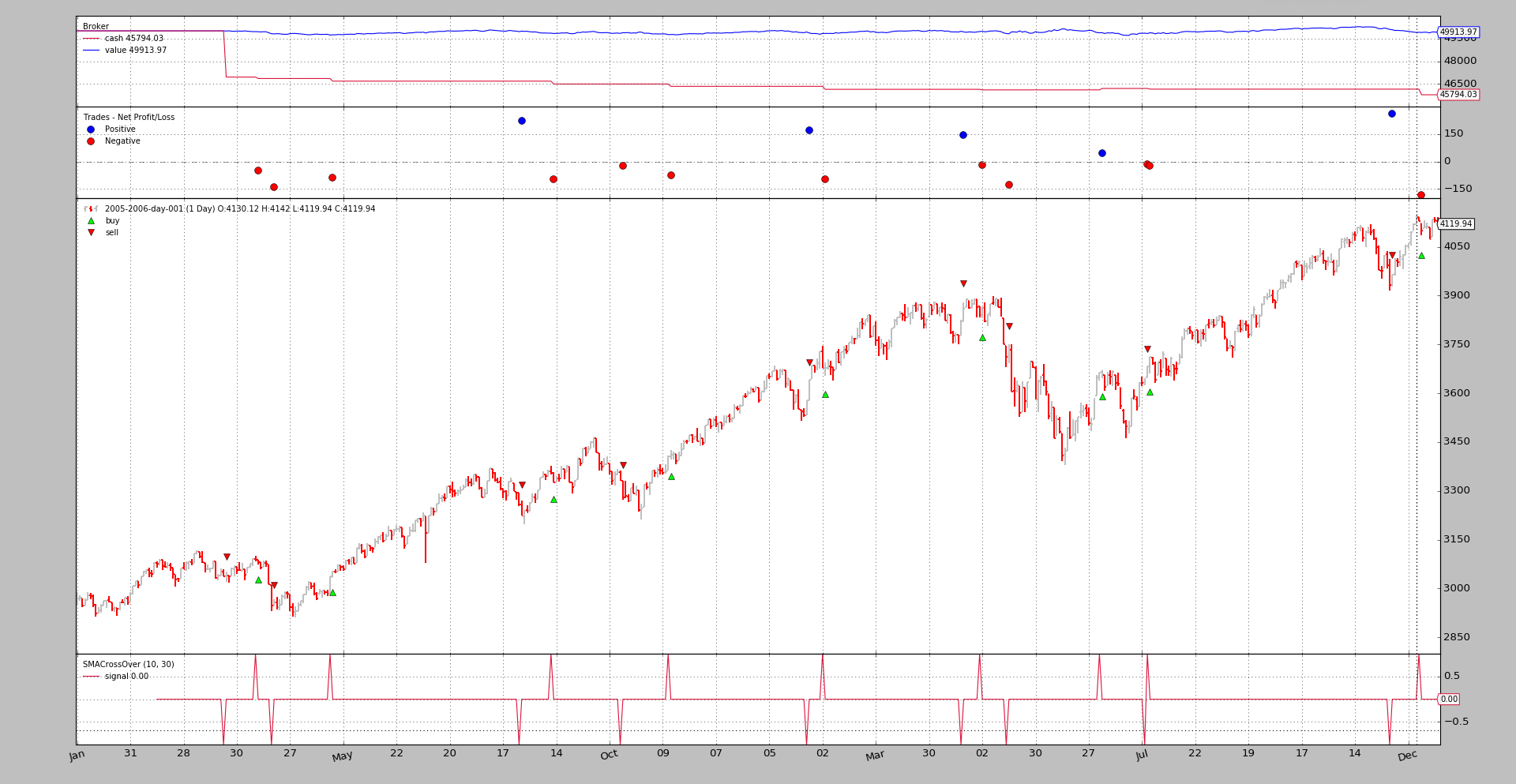
And the same run using slippage with a 1.5% configured:
$ ./slippage.py --slip_perc 0.015
01 2005-03-22 23:59:59 SELL Size: -1 / Price: 3040.55
02 2005-04-11 23:59:59 BUY  Size: +1 / Price: 3088.47
03 2005-04-11 23:59:59 BUY  Size: +1 / Price: 3088.47
04 2005-04-19 23:59:59 SELL Size: -1 / Price: 2948.38
05 2005-04-19 23:59:59 SELL Size: -1 / Price: 2948.38
06 2005-05-19 23:59:59 BUY  Size: +1 / Price: 3034.88
...
35 2006-12-19 23:59:59 BUY  Size: +1 / Price: 4121.01
There is NO CHANGE. This is the expected behavior for the scenario.
-
Execution Type:
Market -
And
slip_openhas not been set toTrueThe
Marketorders are matched against the opening price of the next bar and we are not allowing theopenprice to be moved.
A run setting slip_open to True:
$ ./slippage.py --slip_perc 0.015 --slip_open
01 2005-03-22 23:59:59 SELL Size: -1 / Price: 3021.66
02 2005-04-11 23:59:59 BUY  Size: +1 / Price: 3088.47
03 2005-04-11 23:59:59 BUY  Size: +1 / Price: 3088.47
04 2005-04-19 23:59:59 SELL Size: -1 / Price: 2948.38
05 2005-04-19 23:59:59 SELL Size: -1 / Price: 2948.38
06 2005-05-19 23:59:59 BUY  Size: +1 / Price: 3055.14
...
35 2006-12-19 23:59:59 BUY  Size: +1 / Price: 4121.01
And one can immediately see tht the prices HAVE MOVED. And the allocated prices are worst or equal like for operation 35. This is not a copy and paste error
-
The
openand thehighon 20016-12-19 were the same.The price cannot be pushed above the
highbecause that would mean returning a non-existent price.
Of course, backtrader allows to match outide the high - low range if
wished with slip_out. A run with it activated:
$ ./slippage.py --slip_perc 0.015 --slip_open --slip_out
01 2005-03-22 23:59:59 SELL Size: -1 / Price: 2994.94
02 2005-04-11 23:59:59 BUY  Size: +1 / Price: 3134.80
03 2005-04-11 23:59:59 BUY  Size: +1 / Price: 3134.80
04 2005-04-19 23:59:59 SELL Size: -1 / Price: 2904.15
05 2005-04-19 23:59:59 SELL Size: -1 / Price: 2904.15
06 2005-05-19 23:59:59 BUY  Size: +1 / Price: 3080.40
...
35 2006-12-19 23:59:59 BUY  Size: +1 / Price: 4182.83
A matching expression for the matched prices would be: OMG! (Oh My God!). The
prices are clearly outside of the range. Suffice to look at operation 35, which
has been matched at 4182.83. A quick inspection of the chart in this
document shows that the asset never came close to that price.
slip_match has a default of True and that means that backtrader
offers a match, be it with capped or uncapped prices as seen above. Let’s
disable it:
$ ./slippage.py --slip_perc 0.015 --slip_open --no-slip_match
01 2005-04-15 23:59:59 SELL Size: -1 / Price: 3028.10
02 2005-05-18 23:59:59 BUY  Size: +1 / Price: 3029.40
03 2005-06-01 23:59:59 BUY  Size: +1 / Price: 3124.03
04 2005-10-06 23:59:59 SELL Size: -1 / Price: 3365.57
05 2005-10-06 23:59:59 SELL Size: -1 / Price: 3365.57
06 2005-12-01 23:59:59 BUY  Size: +1 / Price: 3499.95
07 2005-12-01 23:59:59 BUY  Size: +1 / Price: 3499.95
08 2006-02-28 23:59:59 SELL Size: -1 / Price: 3782.71
09 2006-02-28 23:59:59 SELL Size: -1 / Price: 3782.71
10 2006-05-23 23:59:59 BUY  Size: +1 / Price: 3594.68
11 2006-05-23 23:59:59 BUY  Size: +1 / Price: 3594.68
12 2006-11-27 23:59:59 SELL Size: -1 / Price: 3984.37
13 2006-11-27 23:59:59 SELL Size: -1 / Price: 3984.37
Blistering barnacles! Down to 13 from 35. The rationale:
Deactivating slip_match disallows matching operations if slippage would
push the matching price above the high or below the low of the
bar. It seems that with the 1.5% of requested slippage, around 22 of
the operations fail to be executed.
The examples should have shown how the different slippage options work together.